
How does the service measure volume & weight of container contents?
The sensor measures the distance to the surface of the contents in the container. This distance is converted into a fill level, which is essentially the percentage of fullness of the container. Based on the fill level, and knowing the volume of the container, the system calculates the volume of waste inside the container at the time of measuring. Then, having the configuration setting of the average weight of the content per volume, the weight of the materials in the container can be estimated. When containers are collected, the collection events are automatically detected by the system based on changes in distance readings and movements of the container. The volume & estimated weight collected gets recorded in the collection event data point, and these collections events are then reported on in various reports throughout the system, where the data is summarized per week, month, year etc.
What type of bins can the REEN sensors be fitted to?
An REEN sensor can be retrofitted into most bin types (even with ash trays) and have tested them in several hundred different container types.
What is the measurement range and angle of the sensors?
It depends on the model. See per-model summaries below.
WE-009W
W-model sensors ("wide cone") have a total measurement angle of 68 degrees. Within this measurement cone, there is a main beam with a width of 25 degrees and side beams between 16-34 degrees from the center. The benefit of the W-sensor is a wider measurement area. However, for certain types with sound reflecting internal structures, a narrow cone sensor can be more appropriate.
The sensor can measure from 15-20 cm all the way up to 500 cm from the sensor for most content types. If the content reflects ultrasound very poorly, the reliable measurement range can be shorter.
WE-009N
N-model sensors ("narrow cone") have a beam width of around 35 degrees and have no side beams on the side. As such these sensors are best suited for smaller city containers and narrow, deep containers, especially if the container has a bag inside.
The sensor can measure from 15-20 cm all the way up to 500 cm from the sensor for most content types. If the content reflects ultrasound very poorly, the reliable measurement range can be shorter.
WE-10
The WE-10 sensor uses 3 optical time-of-flight sensors to determine the container fill level. The sensors used depend on the mounting:
- When mounted in the top of the container, facing down, the sensor using the top sensor only.
- When mounted on the wall of the container, facing to the side, the sensor uses all three sensors.
The width of the beam of a single optical sensor is 37 degrees. The measurement range depends somewhat on the lighting conditions (best distance is achieved in darkness), but in typical conditions the sensor can measure from 0 - 300 cm.
Can the measurement angle be tuned?
For WE-009-sensors, no, but the sensors do a certain level of tuning with the software to have the best possible accuracy for the configured container type and content type.
For WE-10-sensors the beam is programmable in software to some degree, which allows tuning for specific use cases, if needed.
To have reliable readings, a basic rule is to mount the sensor so that the measurement beam is not hitting any internal structures inside the container, which can disturb the measurements. The appropriate sensor model should be chosen based on the type of container.
What communications technologies do the sensors use?
Our sensors use standard mobile wireless networks for communication. The communication capabilities of different generations of our sensors are:
- WE-008 series: 2G & 3G
- WE-009 and WE-10 series: 2G & 4G (LTE Cat-M1)
Once the sensors have been fitted, how do I see all the data coming in?
The main web front end, REEN Hub (hub.reen.com) collates and displays the data in an easy-to-use format.
How many users can you have in Hub?
The number of users does not currently have a limit, but terms are subject to change in the future, in case the number of users is seen as causing a problem.
What happens if a cardboard box gets wedged inside the bin?
The sensor will suddenly detect the container is “full,” incongruent with typical waste behavior. In many cases this is indicative of a blockage that needs to be dealt with to prevent a overfill and build up of waste outside the container. The system will also not react on a single reading, but will wait to gather a few more readings, before changing the fill level. Temporary blockages will hence not be triggering collections.
How long do the sensors have to be fitted before we can collect to the predictive plans?
We usually recommend a 4-6 week initial data collection period, creating a baseline to compare to. After this time period, the collection crews can start following of the optimized collection plans.
The trend for individual containers typically become reliable already within 1-2 weeks, and for quickly filling containers in just 1-2 days.
I would like to analyse the data that is shown within Hub - can I download these?
Yes, there are daily generated reports as well as customisable reports available for download in XLSX, CSV and JSON formats.
How long do my sensors last?
If treated according to instructions, sensor batteries can last up to 10 years with a 5 year battery warranty to give you peace of mind. Sensors do not require charging, battery changes, or access to sunlight. They’re completely self-sufficient.
How quickly are collections detected?
For containers that are lifted for collection, the detection will happen within minutes of the collection happening, because we can detect the motion of the container during the collection and do an additional communication to the server after that. The default setting for motion-based sending is 17 seconds, i.e. if there is continuous motion for 17 seconds or more, the sensor would wait for motions to stop for 2 minutes and then do a measurement + send to the server. The 17 seconds threshold can be changed with settings templates, but doing so must be done with care, since it can impact negatively on sensor battery life in case there are motions other than those created by collections.
For containers where sensor is not going to experience significant movement during collections, like clothes containers, the time for detection varies and depends on the circumstances. If the distance reading changes more than 80 cm compared to the distance detected before the collection, the sensor will verify in the two following measurements and will then do an additional connection if the distance has stayed more than 80 cm from the reading before the collection. With a 60 minute measurement interval this means that the extra connection would happen 2-3 hours after the collection. If the measurement interval was configured to 20 minutes, this time would be reduced to 40-60 minutes. The 80 cm threshold can also be tuned to be shorter with Analytics Settings (per customer and container type, for example). However, when doing this one must make sure that the new setting will not make it so that sensors connect too often and consume the battery ahead of expectations.
How quickly are temperature spikes detected and an alert raised?
For the sensor, the primary trigger is rate of change. It measures the temperature every 2 minutes* and if the rate of change is bigger than a device model secific threshold, which in our testing has been associated with abnormally quick temperature changes, which do not occur in normal situations. This threshold is different per sensor model, because of the different thermal properties of different models. The actual threshold is proprietary information that we don't generally share with customers.
Once the sensor connects to the server with an indication of an abnormally quick rise of temperature, the server will verify that the reading is at least 3 degrees higher than that of the previous measurement, and if that is holding true, an alert is raised.
The alerts are harvested ever minute, so in total the delay from temperature rising rapidly in the sensor to an email being sent out is at most ~1+2+1 = 4 minutes, but typically ~2-3 minutes. This is regardless of what measurement or send frequency the sensor is configured with.
The temperature spike alerts will be auto-resolved 3 days after being raised and can also be manually resolved on Hub. After that they can still be inspected in the resolved alerts listing.
I don’t want to be sent all around town when the sensor alerts full, how can the REEN system help me manage my collections?
The REEN system doesn’t just tell you when your bin reaches 100%, it continuously monitors and predicts waste behavior and predicts when each container is going to be need collection. This allows for the most efficient planning, telling you which bins can wait and which ones can’t.
REEN offers two different types of collection plans, service lists and Advanced Routes.
Service lists
Service lists are a simpler method of planning, which relies on the configuration of available possible collection days (called Rules in the Schedules configuration). The system will each morning review each container to inspect if it will fill up before the next possible collection day after today, based on the current fill level and the trend based expected fill pattern. If the container is predicted to fill up before the next possible collection date, it is added to today’s plan. If not, it will be left out.
Service list plans are included in the basic service offering, but planning needs to be enabled in the organization settings before plan generation starts.
Advanced Routes
Advanced Routes (AR) is a paid option to the REEN service, which offers revolutionary collection efficiency with minimum manual work. The REEN AR system is conducting advanced mathematical techniques, such as combinatorial optimization, to determine the most efficient collection routes for one or more collection vehicles. It does not only look at what needs to be collected today, but also what needs to be collected in the coming days, and adjusts the routes accordingly. When planning, the system takes into account a large number of different schedules and rules, such as vehicle availability, recurring scheduled visits, forced single visits, maximum collection intervals, vehicle restrictions, temporary site exclusions, site open times and multiple unloading site options. Daily plans are generated automatically by the system, and Hub offers extensive operational tooling to monitor the executions of the generated plans with the REEN Routes app for collection drivers.
Does the sensor feature GPS positioning?
The WE-10 sensor offers GPS positioning, whereas WE-009-models do not.
Something to remember with GPS is that the sensor needs to have a "view to the sky", if not directly, then at least through plastic parts. Metal and other thicker constructs like concrete walls etc. can prevent GPS signals to be captured by the sensor. In those situations even a GPS-enabled sensor needs to fall back on cell tower based positioning, which is significantly less accurate (can pinpoint sensor location typically within a radius of a 1-3 kilometers).
As for asset tracking, we have the CMS Asset service, which is powered by a GPS-enabled tracking sensor LT-1. This unit is purely for tracking the locations of assets, not measuring fill levels of waste containers.
AR: How does the max interval setting work?
The max interval setting defines maximum days between collections. The Advanced Routes planning system makes sure that containers are planned to be collected within time time interval, even if they are not yet full. The feature has been developed to address content types that cannot be allowed to remain in the containers for too long, e.g. bio waste and clothes.
The max interval logic operates based on weekdays, i.e. it does not matter at what time during a specific day the container was/is being collected. For example, if the container was collected at 8 AM Monday, and the max interval is set to 1 day, the system might still be planning a collection later than 8 AM on Tuesday. It might e.g. decide to collect the site at the end of the route at, say, 3 PM on Tuesday.
AR: What is the priority of scheduled visits vs max intervals & full containers?
Scheduled visits are the highest priority and not flexible. Max intervals and overfill are covered efficiently but only within the remaining time between and around scheduled visits.
As an additional point, if not all scheduled visits can be planned as requested, there will be a planning alert showing up in the alerts section, indicating that there is not enough capacity to plan all scheduled visits. However, as of this moment, there is no alert for highlighting that all urgent collections (based on fill levels) cannot be collected. This is something that one must keep an eye on manually and by checking the capacity outlook in the capacity tool.
Are traffic conditions taken into account in Advanced Routes?
In the planning stage routes are optimised based on average traffic conditions. When navigating to a selected site in the REEN Routes app, the live traffic conditions are taken into account. Live traffic situations can also be visualised on the map in REEN Routes and in Hub.
AR: What is the meaning of the capacity view?
The system analyses how much time should be allocated in the vehicle schedules to be able to successfully service all containers. The analysis is based on the schedules in the system and the historical data from the sensors as well as configured schedule and other rules. Logistics managers can keep an eye on these figures to make sure they have enough capacity in their fleet schedules.
Having the allocation at 0% means that the system calculates that the allocated trucks can barely service all containers if all collections are done according to our plans and there are no surprise increases in container build-ups. It is quite common for some unexpected things to happen, so it's good to have some leeway in the allocated schedules. The recommendation is to have the allocation at 5-15% of extra capacity, to be able to handle any unexpected events.
If the number is negative, it means that the system projects that the allocated vehicle schedules will not be enough to collect all containers on time, so there will be a growing problem of overfilling going forward, unless more time is added to the vehicle schedules.
AR: If we skip executing a plan, how long will the system assume that the plan is executed as planned?
Currently the system assumes that a site collection will happen as planned if:
- There is no collection detected yet for the site content type after the start of the frozen plan estimated time period - [uncertainty leeway], AND
- The start of the planning window is not yet past the end of the frozen plan estimated time period + [uncertainty leeway]
… where [uncertainty leeway] is:
- 1.5 hours for containers that are lifted during servicing
- 3 hours for containers that are not lifted during servicing
Otherwise that planned collection is assumed not to have happened, and site will be re-planned in the next plan, the exception being if a collection has been detected.
NOTE: The system performs planning every two hours, and the latest successfully created plan will be “frozen”, or fixed, when the configured freezing horizon has been reached (e.g. 60 minutes before plan is scheduled to start). The logic above applies at the time of planning, which may be up to 2 hours before the freezing moment for the plan. The latest plan generation time can be seen by hovering with the mouse cursor over a date in the Future plans view.
I have an existing driver app. Can I integrate it with your system?
Yes, this is possible through our open API, which all our customers have access to.
API documentation: https://api.reen.com/guide
NOTE: The user account used for the plan execution needs to have plan execution privileges enabled.
Most important endpoints to check for getting plans and recording plan executions
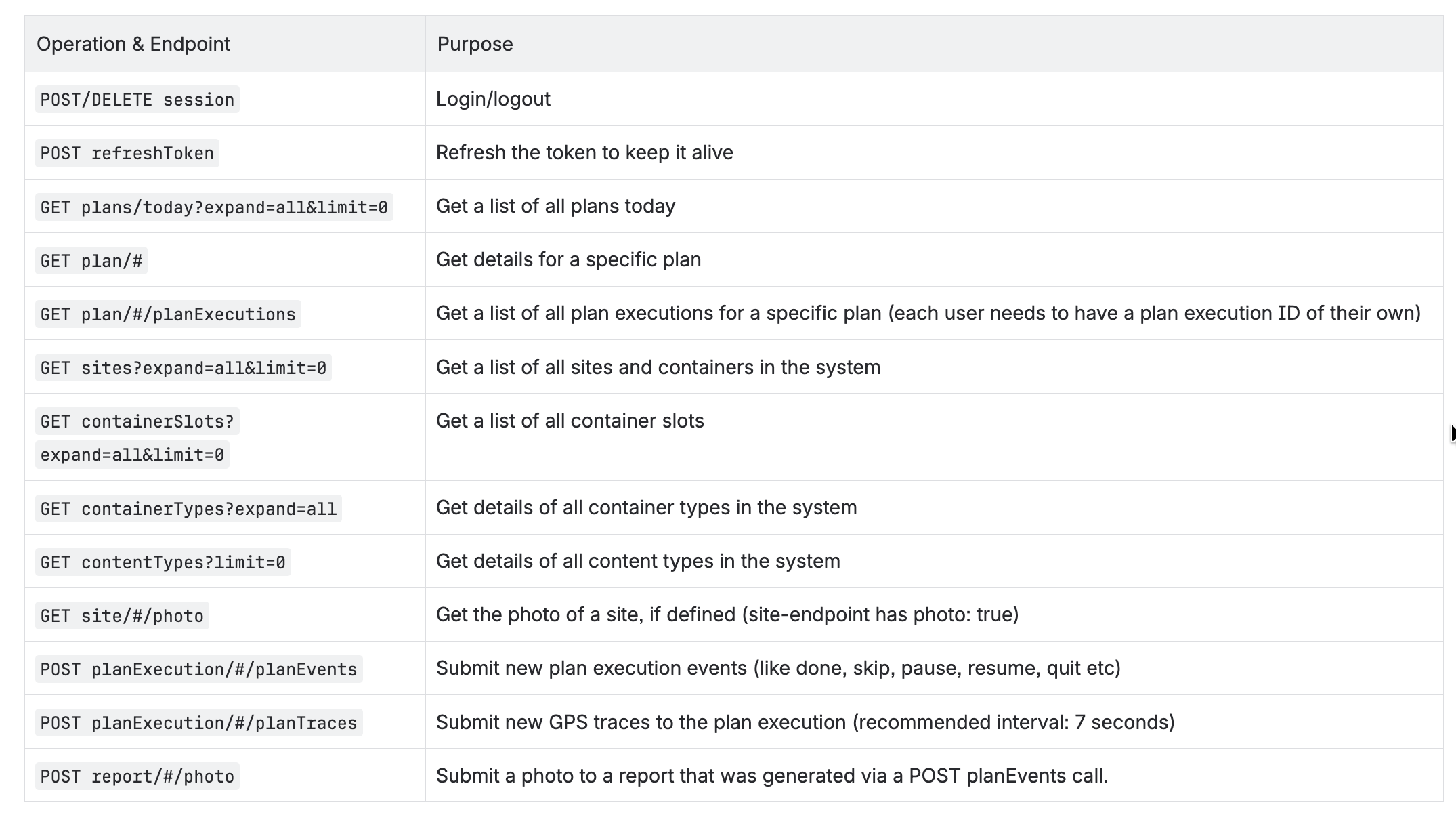
Supplemental endpoints that can be useful

AR: How long from a site does Routes app detect that the site has been visited?
To determine when a site has been visited, the Routes app monitors the vehicle location and speed over time. Arrival at a container site is determined by the vehicle stopping within 20 meters of a configured site location. For other site types the threshold is 50 meters.